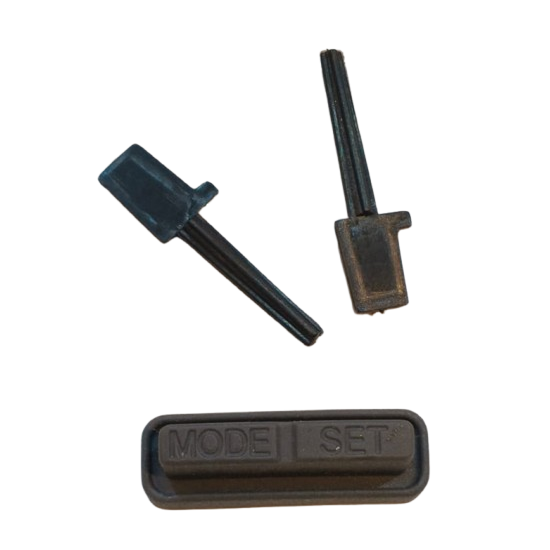
Waterproof Rubber Mode Reset Switch Button Replacement for TVS Jupiter 113 Speedometer - SKU: MRBTJ113D
Guaranteed Fitment
Product Description
Direct OEM Fitment: Engineered under part code MRBTJ113D to fit precisely into the speedometer housing cutout of the TVS Jupiter 113 digital console.
Weatherproof Rubber Seal: Moulded from durable, flexible elastomeric rubber that prevents rainwater, wash water, and dust from entering the instrument panel.
Complete Actuator Kit: Includes the outer embossed \"MODE | SET\" rubber keypad pad along with the internal push-rod actuator stems for responsive operation.
UV & Thermal Resistance: Formulated to resist cracking, hardening, and fading under direct sunlight exposure.
Restores Display Cycling: Allows seamless toggling between Odometer, Trip A, Trip B, Clock, and Service Reminder indicators.
Regain effortless control over your trip meter, digital clock, and display modes with the Mode Reset Button for TVS Jupiter 113 Digital Meter (SKU: MRBTJ113D). Over time, constant exposure to sunlight, rain, and repeated press cycles causes factory rubber meter buttons to harden, tear, or lose responsiveness. This direct replacement rubber button kit restores smooth, tactile \"MODE\" and \"SET\" switching while re-sealing your digital instrument console against water ingress and internal PCB short-circuits.
A torn or missing meter button allows rainwater to seep directly into your scooter’s electronic display board, leading to costly digital console failure. Replacing a damaged button with the MRBTJ113D rubber mode reset button kit provides an instant, low-cost fix that safeguards your digital display and restores easy trip resetting.
Recognizing Meter Button Failure Symptoms
Torn or Cracked Outer Rubber: Visible tears or holes on the \"MODE | SET\" rubber pad allowing water to seep into the dashboard.
Non-Responsive Display Toggling: Pressing the button fails to cycle between trip meters, clock settings, or eco/power mode statistics.
Stuck or Sunken Button: The button remains pushed down into the housing and does not spring back up after release.
Fogging Inside Meter Glass: Condensation appearing on the inner speedometer lens after rain or washing, caused by degraded button seals.
Maintenance & Installation Best Practices
Clean Sealing Groove: Ensure the mounting groove around the speedometer cutout is thoroughly cleaned of old rubber debris and dirt before pressing in SKU MRBTJ113D.
Align Actuator Stems Correctly: Position the long plastic actuator rods squarely onto the PCB micro-switches before snapping the outer rubber pad in place.
Avoid Sharp Tools During Fitting: Use smooth plastic trim tools or fingers to push the rubber lip into place; avoid sharp screwdrivers that can pierce the new rubber pad.
Technical Specifications
| Product Type | Scooter Digital Instrument Cluster Rubber Button & Actuator Kit |
| SKU / Part Number | MRBTJ113D |
| Material Composition | High-Grade Weatherproof EPDM Rubber & Durable Plastic Stems |
| Color | Matte Black |
| Key Markings | Embossed "MODE | SET" Text |
| Package Contents | 1 x Outer Rubber Button Pad + 2 x Internal Push-Actuator Stems |
| Compatibility | TVS Jupiter 113 (Digital Meter Variants) |

